
Email marketing is a huge part of event promoters’ strategy, especially in those last few days leading up to the event when local event attendees are most likely to make an impulse purchase to attend. This is when you’ll want to make that big final promotional push. That’s where we come in.
Why is Email Marketing Still Effective for Selling Tickets in 2025?
- ROI (Return on Investment) is huge. On average, businesses are seeing $36 for every $1 spent on email marketing. (Constant Contact)
- Conversion & Purchase Behavior. About 52% of consumers made a purchase directly from an email in the past year. (OptinMonster)
- Open & Click Rates Are Solid. For sectors like Entertainment & Events, open rates can be a bit higher. In one dataset, “Entertainment and Events” shows ~ 43.79% open rate. (MailerLife)
- Email is One of the Most Effective Channels. Many marketers rank email among their top 1-3 channels for driving revenue and conversions. (Tidio)
How Evvnt’s Premium Email Marketing Tool Works
Evvnt offers a built-in Premium Email Marketing tool that allows you to reach thousands of local eventgoers instantly. We curate a custom localized leads list and design your event into a beautiful email in minutes.
For the purposes of this article, we’ve demoed the email marketing tool via our sleek, recently redesigned Ticketing App. If you prefer to use our marketing app, you can still access the email marketing services there. Same service, just a little less visually appealing.
Step 1: Create Your Event Listing
Head to our ticketing platform powered by Evvnt and create your event listing.
Fill out your event details: title, description, date, time, and location. Upload your graphics and pick your category.
Step 2: Auto-Generate and Customize Your Email
Once your event is posted, scroll down on the event’s main page and click the blue “create email campaign” button.
Your email design is automatically built from your event listing. You can edit the text as needed and send yourself a test email to share with your team.
Step 3: Choose Your Audience
Zip Code & Category Targeting
Select the geographic area(s) and interest categories that match your ideal audience.
Evvnt curates a targeted list of opted-in email subscribers based on this data, no need to bring your own list.
Step 4: Schedule Your Email Blast
Pick the exact date and time you want your campaign to send.
Set it and forget it, your email will land in inboxes right when you want it to.
Step 5: Track Your Results
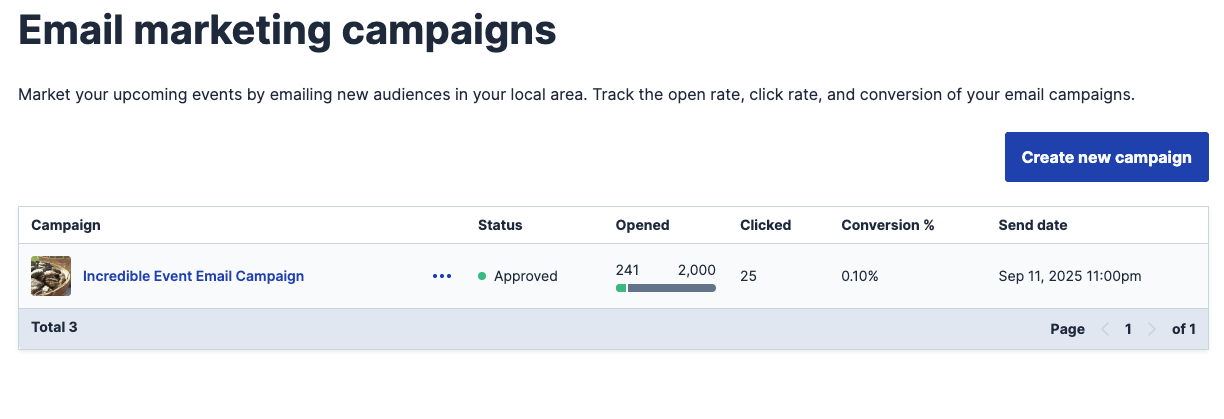
After sending, monitor opens, clicks, and engagement with Evvnt’s simple reporting dashboard.
Use this data to improve your next send or prove ROI to your team.
How Evvnt’s Premium Email Marketing Tool Goes Above & Beyond Expectations
We Provide the Audience. No list? No problem. We curate the leads for you, simply choose your location, interest categories, and the number of people you want to email about your event.
We Make Design Effortless. Our tool automatically builds your email from your event listing, creating a professional, eye-catching design in minutes.
All that’s left for you is to edit or add any details you’d like. No design or coding skills required.
You Stay in Control. Choose your subject line and schedule the exact date and time your email hits inboxes. You’re in charge from start to send.
You See Real-Time Results. Track your campaign’s performance instantly with our reporting dashboard, featuring real-time open rates and click data so you can measure engagement and optimize your next send.
Premium Email Marketing FAQs
Which events qualify for email marketing services?
Email Marketing is currently only available for physical events happening within the USA. Your event must have a US zip code to qualify for email marketing services. We’re working towards a solution to expand worldwide, but for now it is US-based.
Can I edit my event marketing email?
Of course, while creating your event’s email, you can edit copy. However, once you’ve scheduled and paid for your email, you will no longer be able to edit any part of the email. So always make sure to double and triple check the email fully before scheduling. Send yourself the test email to see how it all looks.
Do I get to choose the day and time my event email will be sent?
Yes, you can schedule the exact date and time of your promotional email marketing send. We highly recommend sending your email within days before the event. If it’s a weekend event, we see the best results from sends going out Thursday afternoon when people are planning their weekend.
What is the sending email and name they’ll see?
Emails come from email@evvnt.com and you get to choose the sending name.
Where does the email list come from? Is it qualified?
Evvnt owns one of the largest ticketing and event promotion networks in the world. We have access to a database of around 150 million opted-in email addresses obtained through opt-in online surveys, e-subscriptions, e-registrations and our extensive network of permission-based websites. Any data obtained is put through a thorough hygiene and validation process for deliverability using multiple 3rd party sources. We then use partner sourcing for data profiling, appending up to 400 available selects or demographic filters for precise targeting of an individual. Our team is diligent with maintaining and updating our unsubscribe lists.
How can I segment and target within the audience?
Audiences are segmented and targeted by location and interest. You’ll put in the zip code of the event or whichever local area you’d like to send to and choose the category of interest you’d like the audience to have.
What’s your average open/click rate for Evvnt’s email marketing services?
These metrics can’t be generalized due to the vast differences in event types, location of event and send times. While we can’t give specific data, we can say our event promoters who use our email marketing services are extremely satisfied and reuse the service often.
Can I track open and click-through rates?
Yes. Every email includes full reporting with open rates and click-throughs to your event or ticketing page. See examples below;
Can I send more than one email per event? Or target more than one zip code/interest?
Yes, once you book your first send, simply create another email the same way you made the first.
Do I have to purchase a Premium Listing to use Evvnt’s email marketing?
No, you can still purchase the email without adding the Premium Listing, but you already know we’ll be heavily recommending you consider upgrading. These two products perform exceptionally well when paired.
How do I change the images on the email?
To update images in the email, change the images on your event listing—they’ll sync automatically.
Can I actually talk to someone to ask more questions or to help me set up my email campaign?
Of course, Evvnt is known for having one of the strongest customer service teams in event marketing. Most places you can’t even get anyone on the phone, but we are always happy to answer questions or help you set up your email campaign. Simply email support@evvnt.com or book a demo with one of our sales agents.